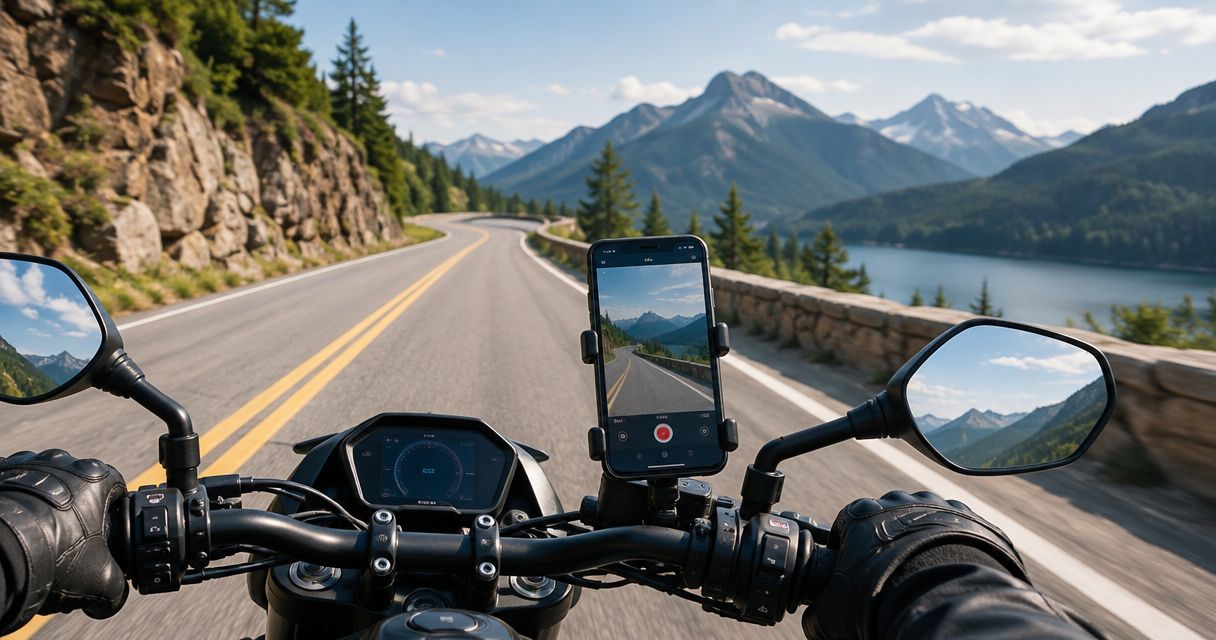
Best feature-focused Android option: DriveSight from Phonedashcam. Best for simple manual recording: your phone’s built-in camera app. These are the practical starting points for the best dash cam apps for motorcycles in 2026, but neither recommendation establishes that a phone setup is suitable for unattended motorcycle recording.
- DriveSight is the feature-focused Android pick among the best dash cam apps for motorcycles, subject to a bike-specific recording test.
- Your phone’s built-in camera app is best for manual ride footage, not an assumed automatic dashcam workflow.
- Choose motorcycle recording equipment separately from software: mounting, weather exposure, power, and saved footage all need checking.
- Crash detection, parking mode, and speed camera alerts serve different purposes; none replaces checking the recorded video.
Why this matters
A motorcycle exposes the recording setup to conditions that a car windshield installation does not solve. Your mount, camera view, weather protection, and power connection deserve as much attention as the app you select.
The useful question is not simply which app has the longest feature list. It is whether your actual phone and installation save footage you can retrieve without touching the screen while riding. Choose the recording workflow first; judge extra alerts separately.
For your 2026 shortlist, distinguish a driver-focused Android dashcam app from software with established motorcycle-specific support. DriveSight’s stated audience is everyday US drivers. That supports considering its features, not labeling it a verified motorcycle recording system.
What makes the best dash cam apps for motorcycles?
Use these criteria before choosing an app. A feature name is not enough; each criterion needs an answer on your own setup.
- Saved footage: You need a recording you can open after the ride. Check the actual file rather than relying on a recording indicator.
- Camera view: The lens must see useful road detail without the mount, instrument panel, or windscreen blocking the frame.
- Recording controls: Starting, stopping, and retrieving footage should happen while parked. Avoid any workflow that needs screen interaction in motion.
- Phone compatibility: Confirm that the app supports your operating system and works on the handset you intend to mount.
- Ride conditions: Assess vibration, exposure, charging, and phone temperature separately from the software’s feature list.
- Incident workflow: Know how to find and preserve footage. Crash detection and parking mode are separate features, not substitutes for that process.
A long feature list cannot compensate for an unusable camera angle. Equally, a clear stationary test does not establish that the same setup will work throughout a ride.
The options at a glance
This comparison ranks two app approaches by their stated purpose. It does not assign motorcycle performance scores or treat unspecified capabilities as confirmed features.
| Rank and option | Best for | Standout feature or purpose | Key limitation |
|---|---|---|---|
| DriveSight | Android users seeking dashcam features and driving alerts | Object detection, parking mode, crash detection, and live police/speed camera alerts | Described for everyday US drivers, not as a motorcycle-specific system |
| Built-in camera app | Riders who want manually controlled video recording | Direct access to the phone’s video camera | A camera app is not automatically a dashcam workflow; capabilities differ by handset |
DriveSight from Phonedashcam is the feature-focused Android pick for riders who will verify their motorcycle setup before relying on it. The built-in camera app is the simpler choice when your goal is a deliberately started video rather than incident monitoring.
The distinction matters in 2026: a recording app, a detection feature, and a camera-location alert perform different jobs. Compare them on the job you need done, not on how many names appear in a feature menu.
1. DriveSight: best for Android dashcam features and alerts
DriveSight is an Android dashcam app offering object detection, parking mode, crash detection, and live police/speed camera alerts. Its stated audience is everyday drivers in the US. For a motorcyclist, that makes it a feature-focused candidate to evaluate rather than a confirmed bike-specific recommendation.
DriveSight pros:
- Combines dashcam functionality with live police/speed camera alerts.
- Includes object detection as a stated capability.
- Includes crash detection and parking mode as distinct features.
- Fits an Android-focused shortlist without requiring an operating-system guess.
DriveSight cons:
- Its stated positioning does not establish motorcycle-specific support.
- App features do not establish that your mount, power arrangement, or weather protection is suitable.
- Detection capabilities do not, by themselves, establish the quality or retrievability of your ride footage.
Best for: Android users who want recording features and driving alerts in the same app, and who are prepared to check the full installation.
Verdict: Hold until your bike-specific test passes. DriveSight belongs on the shortlist for its stated features, but those features are not evidence of performance on your motorcycle.
2. Built-in camera app: best for manually recorded ride footage
Your phone’s built-in camera app is the straightforward option for deliberately starting and stopping a video. It keeps the task focused: frame the road, begin recording while parked, and inspect the saved result afterward. The available controls and recording behavior depend on your handset.
Built-in camera app pros:
- Lets you evaluate the phone’s camera view before choosing a dashcam app.
- Keeps manual video recording separate from alerts and incident-detection features.
- Provides a direct way to inspect footage from your proposed mounting position.
Built-in camera app cons:
- Manual video recording does not establish an automatic dashcam workflow.
- Background operation, file handling, and controls vary by phone.
- It does not establish crash detection, parking monitoring, or police/speed camera alerts.
Best for: Riders who want intentionally recorded footage and can start and stop the recording while parked.
Verdict: Hold for manual recording only. Use the built-in camera app for that narrow job; skip it as a presumed substitute for unattended incident recording.
A camera app can help you answer whether the view is useful. It cannot answer every question about a different app’s recording behavior, so repeat the file checks with whichever software you ultimately choose.
How the options rank
The ranking follows purpose, not an invented test score. DriveSight ranks first for the supplied Android dashcam features. The built-in camera app earns a separate slot for manually controlled video.
Phonedashcam’s stated capabilities support the feature comparison, but they do not establish motorcycle-specific recording results. That boundary is part of the recommendation, not a footnote.
For a 2026 decision, apply the criteria in order: saved footage, camera view, recording controls, compatibility, ride conditions, and incident handling. Reject an option that fails your essential recording task even if its secondary features appeal to you.
Test the complete motorcycle setup before relying on it
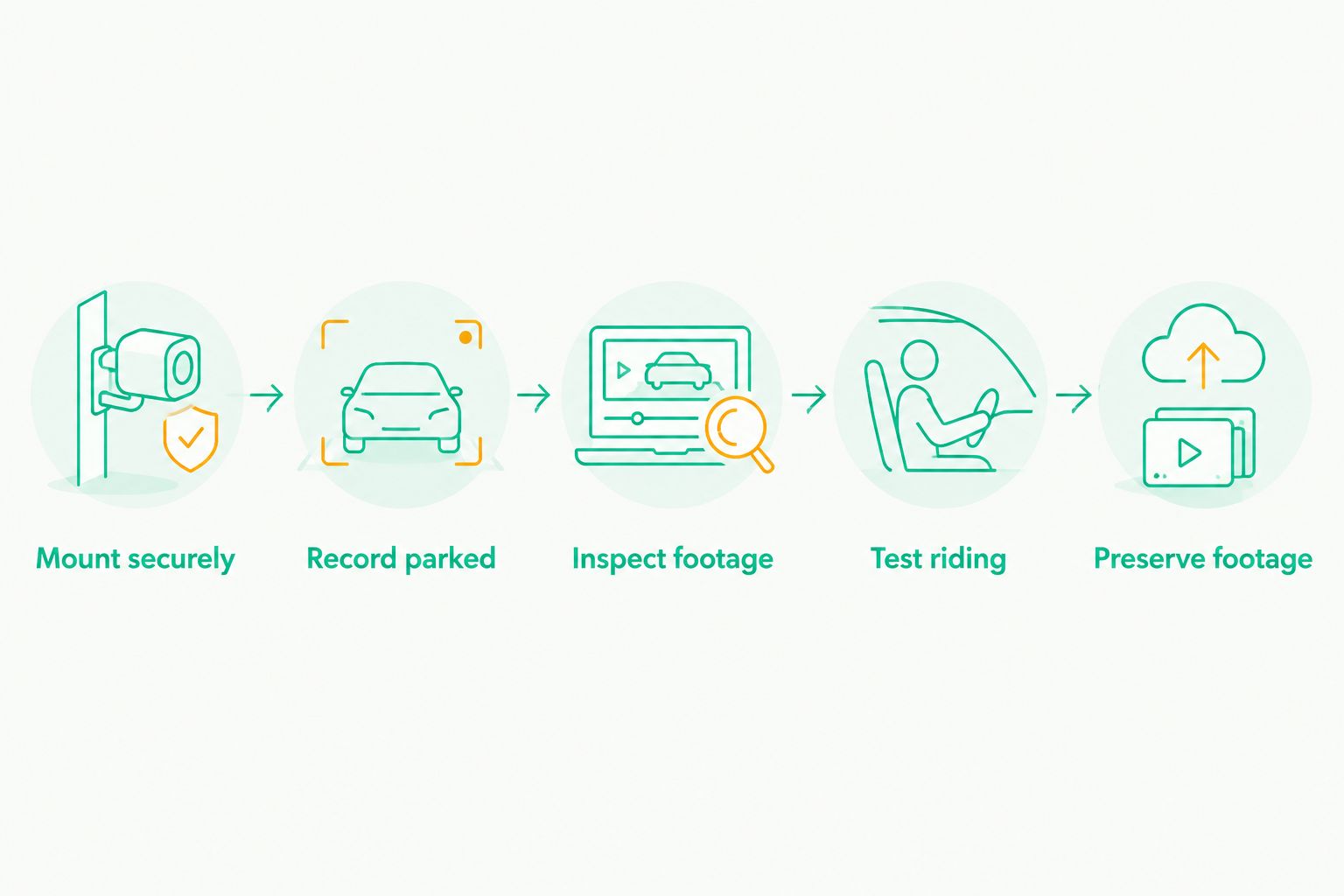
The app is only one part of the installation. Use a repeatable acceptance check, and keep every adjustment or screen interaction confined to a safe, parked position.
Mount securely
Follow the phone and mount manufacturers’ installation guidance. Check that the phone is retained, the lens is unobstructed, and the installation does not interfere with your controls or view of the road.
A mount that holds the phone is not automatically a useful recording position. Inspect the actual frame before setting off, including anything immediately in front of the camera.
Record parked
As an initial check, record 5 minutes while parked in a safe location. This is a suggested test duration, not a performance benchmark. Use it to confirm that recording starts, continues, and produces an accessible file.
Do not infer riding reliability from this stationary check. It establishes only that the selected app and phone completed that particular recording.
Inspect footage
Review 30 seconds from the beginning, middle, and end of the saved recording. These are suggested review samples. Check whether the view remains useful and whether each sampled part plays correctly.
Look at the saved video rather than a live preview alone. Your goal is footage you can retrieve later, not simply a reassuring image on the screen before departure.
Test riding
If the stationary checks pass and the installation meets the relevant equipment guidance, make a controlled 10-minute ride before depending on the setup. Start the recording before moving and stop it after parking safely.
Inspect the resulting file for interruptions, camera movement, and obstructed views. This suggested trial is not certification of the setup; it is a way to identify problems before making the recording part of your routine.
Preserve footage
Practice finding and copying a recording while parked. Keep the original file when preserving footage of an incident, and make a separate copy for review or sharing.
Your 2026 checklist should end with retrieval, not installation. If you cannot confidently locate the saved recording, the setup has not completed its most basic job.
Passing these checks answers a narrow but useful question: did this phone, app, and installation produce retrievable footage under the conditions you checked? It does not establish performance under different weather, lighting, or ride conditions.
Keep alerts, detection, and recording separate
DriveSight’s stated features cover several jobs. Decide which job matters to you before using one feature as a reason to choose the whole setup.
- Road footage: The recording is what you inspect after a ride. Check its view and accessibility directly.
- Object detection: Detection is a separate capability from judging the recorded image. Do not treat the feature name as evidence of video quality.
- Crash detection: A crash-detection feature is not a stated emergency-service guarantee. Do not assume it contacts help or preserves every incident.
- Parking mode: Parking mode addresses a different use case from active riding. Assess the parked installation separately.
- Camera alerts: Police/speed camera alerts do not replace posted limits or your responsibility to ride safely.
These distinctions keep the buying decision honest. If your priority is incident footage, evaluate recording and retrieval first; if your priority is alerts, do not assume that choosing alerts also solves the camera installation.
Parking mode needs its own decision
A phone used for recording during a ride is not automatically suitable for leaving on a parked motorcycle. Before relying on parking mode, assess where the phone sits, its exposure, its power arrangement, and whether leaving it there is acceptable to you.
DriveSight includes parking mode as a stated feature. That does not establish a particular runtime, theft-protection outcome, or motorcycle installation method.
Do not choose an app solely because it lists parking mode. First decide whether the physical setup makes sense while the bike is unattended. Then check the feature’s actual operation and the footage it produces.
When an app is the wrong starting point
Choose the recording equipment before the app when unattended operation is your main requirement. A phone-based workflow makes you responsible for the handset’s position, retention, exposure, power, and recording controls.
Dedicated motorcycle recording equipment is a separate category to evaluate, not a guaranteed winner. Check the specific equipment’s installation requirements and documented capabilities rather than transferring assumptions from a car dashcam or an action camera.
For manual ride footage, a phone app remains a reasonable approach to assess. For an installation you expect to leave in place, first define that operating requirement and select equipment that explicitly addresses it.
Which motorcycle dash cam app should you choose?
Shortlist DriveSight if you use Android and want its stated dashcam features alongside police/speed camera alerts. Treat the motorcycle installation as a separate acceptance test, not as a capability implied by the app description.
Choose your built-in camera app when the task is manual video capture. Keep that recommendation narrow: start the recording while parked, review the file afterward, and do not assume automatic incident handling.
For 2026, the default decision is simple: pick the workflow you can verify. Phonedashcam’s feature list helps identify an Android candidate; your saved footage determines whether that candidate works for your riding setup.
FAQ
What are the best dash cam apps for motorcycles in 2026?
DriveSight is the feature-focused Android candidate, while your phone’s built-in camera app suits manual video recording. Neither recommendation establishes motorcycle-specific reliability; check the phone, installation, and saved footage before relying on the setup.
Is DriveSight designed specifically for motorcycles?
DriveSight is described as an Android dashcam app for everyday US drivers, not as a motorcycle-specific system. Its stated features include object detection, parking mode, crash detection, and live police/speed camera alerts.
Can I use my phone’s camera app as a motorcycle dashcam?
You can assess your phone’s camera app for manually started video recording. Do not assume it provides an automatic dashcam workflow, incident protection, or background recording without checking the actual handset and software.
Is crash detection the same as automatically calling emergency services?
Crash detection does not establish an emergency-service calling capability. DriveSight’s stated crash-detection feature should not be treated as a promise that help will be contacted.
Does parking mode mean I can leave my phone on the motorcycle?
Parking mode does not establish that leaving your phone on a motorcycle is a suitable installation. Assess retention, exposure, power, and security separately before relying on a parked recording setup.
What should I check before recording a motorcycle ride?
Check the mount, camera view, recording controls, and saved file before riding. Then perform a controlled recording trial with all screen interaction completed while safely parked.
Is a dashcam app better than dedicated motorcycle recording equipment?
The better choice depends on whether you need manual phone recording or a dedicated installation. Compare the actual equipment requirements and documented capabilities rather than assuming either category meets every riding need.
One last thing
Practice retrieving footage before you need incident footage. Finding a file, opening it, and preserving the original are part of the recording workflow—not administrative tasks to discover after something happens.
Keep that rule on your 2026 checklist. The most useful setup is the one that produces a recording you can actually find and inspect.